
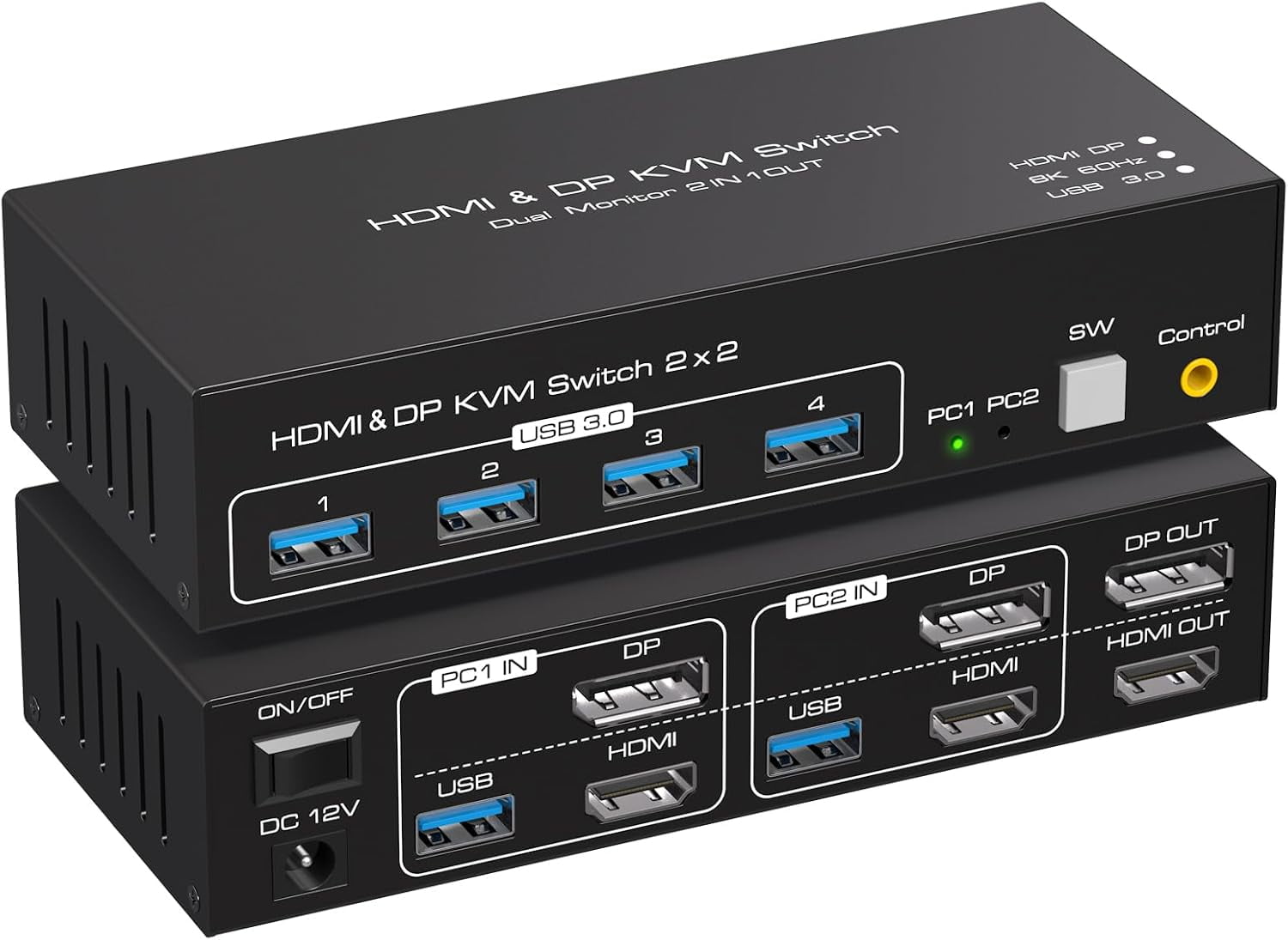
8K@60Hz HDMI+Displayport KVM Switch 2 Monitors 2 Computers USB 3.0 KVM Switcher Dual Monitor 2 Port for 2 PC Share Multi Monitor and 4 USB Devices with Wired Controller DC Adapter
Product details
| Management number | 238539322 | Release Date | 2026/07/11 | List Price | US$40.00 | Model Number | 238539322 | ||
|---|---|---|---|---|---|---|---|---|---|
| Category | |||||||||
【HDMI+Display Port Dual Monitor KVM Switch】This composite KVM switcher allows you to control two computers or laptops with just one set of wkeyboard and mouse. You can also share up to four USB 3.0 devices and connect two monitors in either extended or copy display mode. (Note: This KVM switch does not support hotkey switching) 【Copy & Extended Mode】In extended mode, you can display two different screens, while in copy mode, two identical screens will be displayed. NOTE: You need to connect both DP and HDMI cables to display dual monitors properly, and your computer needs to support multi-screen display. You can press "Window+P" to switch between the extended and duplicate modes. 【HDMI 2.1+DP 1.4 KVM Switch】Dual monitor kvm switch supports resolutions up to 4k@120Hz and 8K@60hz, and is backward compatible with 4K@60hz, 4K@30hz, 1080P, 720P, etc. So, two sources with different resolutions can also be used together. It supports various systems such as Windows/Vista/XP and Mac OS, Linux and Unix, and is plug and play. 【USB 3.0 KVM Switch】This dual monitor KVM switch along with 4 USB 3.0 ports for keyboard, mouse, printer, scanner, and other USB device recognition. With USB 3.0 technology, data transfer speeds of up to 5Gbps are achievable, far surpassing the data transfer speeds of USB 2.0, which max out at 480Mbps. Plug and play, without any software driver.(Note: The KVM switch power input is connected to 12V, which can drive high-power USB devices, such as hard disks, network cameras, etc.) 【External Controller & 12V/1A DC Adapter】The KVM switcher is equipped with a wired desktop controller, which is more comfortable to press and making your desktop more tidy. The high-power adapter can drive up to 10W of USB devices, in addition to a mouse and keyboard, it can also drive hard drives, network cameras, etc 【NOTE】1.It is required that the signal sources have HDMI+DP output ports, and DP+HDMI cables need to be connected to display dual screens normally 2.The signal source must support multi-display; How to confirm? You can connect the source directly to 2 monitors (not through KVM). Your computer supports multi-monitor display if both monitors have a display. Note:1. kvm has DP&HDMI ports,PC must have DP+HDMI port 2. Don't support the signal conversion function (HDMI input can only be output to a monitor with HDMI, DP input can only be output to a monitor with DP). The DP and HDMI ports of pc1 in on the kvm must be connected to the same PC,pc2 ditto.
- 【KVM Switch Dual Monitor】The kvm switch 2 monitors allows you to control two computers sharing two monitors with one set of keyboard and mouse,KVM switches support extended© mode.The kvm 2 monitors Includes DP and HDMI ports,so please make sure your computers/laptops/docking stations have DP+HDMI port,and KVM don't support the signal conversion function (HDMI input can only be output to a monitor with HDMI, DP input can only be output to a monitor with DP). The DP and HDMI ports of pc1 in on the product must be connected to the same computer,pc2 ditto
- 【Support Ultra HD 4K@60hz Visuals】The hdmi+ dp kvm switch 2 monitors support resolution up to 3840*2160@60Hz(4K@60hz) and is backward compatible with 4K@30Hz,and 1080P@60Hz, Immerse yourself in the world of crystal-clear images,Brings you realistic visual enjoyment . Note: If you need to output 4K@60Hz resolution, please make sure your HDMI cable, computer and monitor support 4K@60Hz
- 【Support 4 USB 3.0 Peripherals】The kvm switch 2 monitors 2 computers has 4 USB 3.0 ports for sharing mouse, keyboard, USB printers, scanners, etc.data transfer rate up to 5Gbp/s, which is 10 times faster than USB 2.0 ports. And is backwards compatible with USB 2.0 and USB 1.1 devices. Note:If the input USB3.0 ports are not connected or connected incorrectly, the USB device will not be recognized.Supports various systems such as Windows/Vista/XP and Mac OS, Linux and Unix, and is plug and play
- 【Two Switching Way】The displayport hdmi kvm dual monitor supports panel button and external wire controller switching.Using the wired extension button, you can place the KVM outside the work area, making your desktop cleaner and tidier.Or just press the panel button next to the indicator light to achieve one-click switching,Let you can save more time to do other things!NOTE: Keyboard shortcuts (hotkeys) toggles are not supported
- 【12V DC Power Adapter】Please make sure each of your PC has the ability to support dual display before purchasing.KVM switch dual monitor is equipped with a 12V/1A DC power adapter,with the external power design,usb devices can obtain a stable working environment through the switch.If you have any questions while using the product, please reach out to our professional technical team for assistance
| Brand | KSRplayer |
|---|---|
| Number of ports | 2 |
| Maximum number of monitors | 2 |
| Connection | HDMI, DisplayPort |
| Resolution | 4K (2160P) |
| Form factor | Desktop |
| Height | 2.6 in |
| Accessories | Package contents: 1 x KVM Switch 2x2 2 x USB 3.0 data cable 1 x DC power adapter 1 x External switch kit 1 x User Manual |
| Has nrtl listing certification | N |
| Weight | 0.65 lb |
Correction of product information
If you notice any omissions or errors in the product information on this page, please use the correction request form below.
Correction Request Form